If you browse the web using Google Chrome every day, you need to stop what you are doing right now and check your browser version. Google recently rolled out a major security patch addressing a staggering number of security flaws. Specifically, the latest Google Chrome update 37 vulnerabilities fix is designed to block attackers from executing malicious code on your computer.
Cybersecurity teams discovered these critical flaws affecting users across Windows, Mac, and Linux platforms worldwide. Ignoring this update prompt leaves your system vulnerable to memory corruption and unexpected browser crashes. Understanding what went wrong, how the software fails, and what steps you need to take takes just a minute of your time.
Understanding the Scope of the Chrome 155 Security Update
The latest software deployment arrives as the Chrome 155 security update, bringing versions 155.0.8059.79 and 155.0.8059.80 to desktop environments. Google engineers and external researchers found a total of 37 security issues hidden deep within the browser architecture.
The breakdown of these patches highlights the severity of the situation. Out of the 37 total bugs, seven are rated as critical, twenty-nine are classified as high severity, and one sits at medium severity. These flaws impact various browser components, including networking layers, PDF handlers, graphics engines, and media processing tools.
Attackers love finding weak points in widely used software because a single browser exploit can compromise an entire workstation if conditions are right. Security experts emphasize that keeping automated updates active or manually checking for updates is the single best defense against these emerging malware vectors.
The Chrome Use-After-Free Vulnerability Explained Simply
Many internet users hear terms like memory corruption and feel lost. However, the technical mechanics behind these bugs become straightforward when broken down. A Chrome use-after-free vulnerability explained reveals how software memory management errors open the door for hackers.
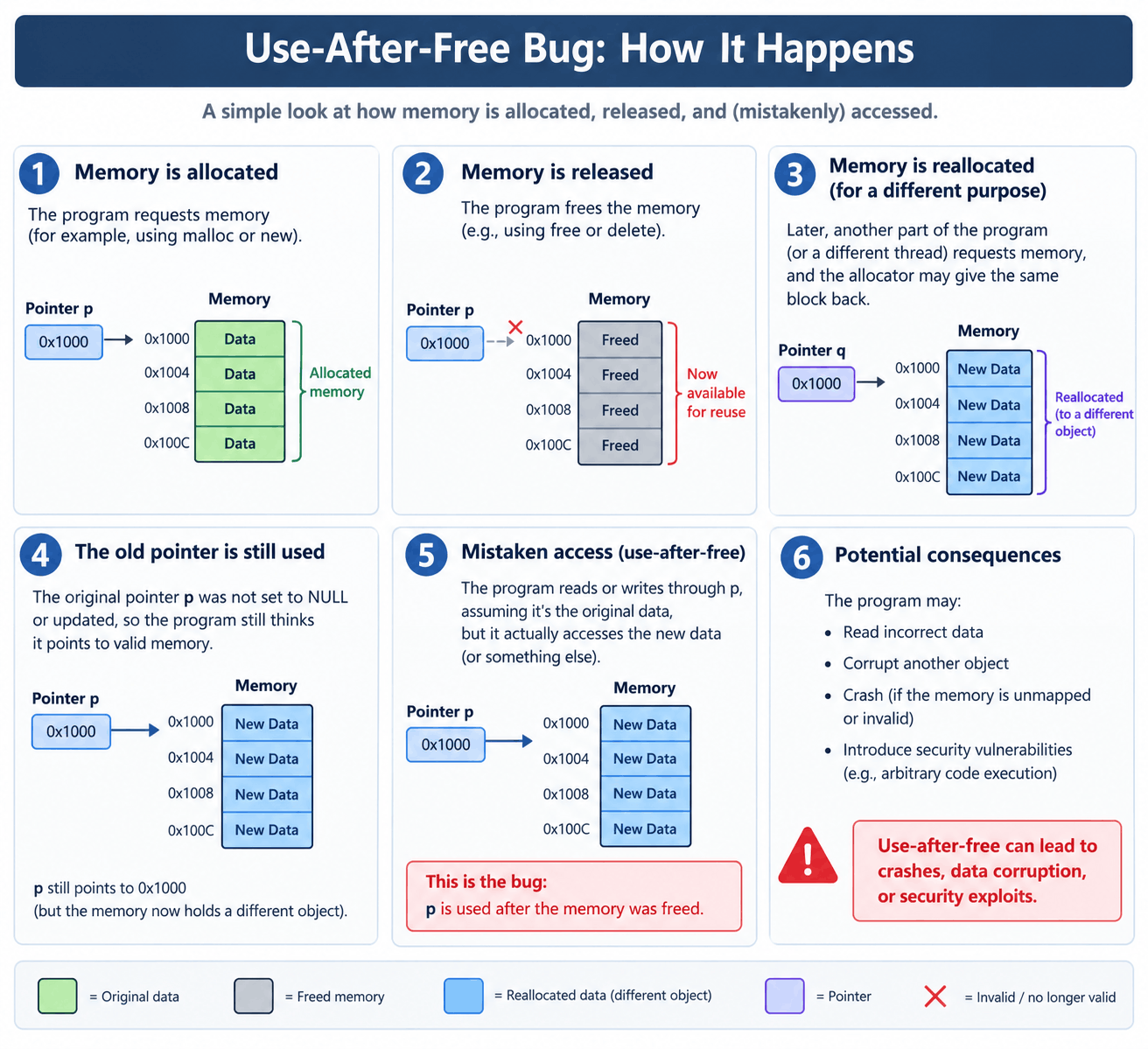
In simple terms, computer memory gets allocated for specific tasks when you open a tab or load a webpage. Once the task finishes, the memory should be cleared or marked as free for other programs. A use-after-free bug happens when the software tries to access that same memory location after it has already been released.
If a clever hacker manipulates this broken memory pointer, they can trick the browser into executing arbitrary code of their choice. Among the newly patched flaws, six critical bugs stem directly from these dangerous use-after-free errors. They lurk inside core browser operations, network handlers, PDF rendering tools, and media modules.
Inside the Critical Flaws Found in Graphics and Media
Beyond the memory management bugs, researchers identified another severe issue involving graphics translation. Specifically, security bug CVE-2026-110152 highlights a dangerous buffer overflow inside ANGLE, which is Chrome's core graphics translation layer.
A buffer overflow occurs when software writes more data into a memory buffer than it can actually hold. The extra data spills over into adjacent memory spaces, corrupting data and altering normal program behavior. Researchers noted that this particular flaw was reported by an external security specialist, prompting immediate action from Google development teams.
Other high-severity entries in the bug report target V8, the underlying engine that processes JavaScript and WebAssembly inside your browser. If a user lands on a specially crafted malicious webpage, attackers could leverage V8 type confusion or buffer overflows in PDFium and animation components to bypass security checks. While these bugs generally execute code inside a restricted browser sandbox rather than giving full operating system control, they still pose a massive security risk to daily users.
How to Protect Yourself and Update Your Browser Today
Securing your computer against these threats does not require advanced technical skills. Google built an automatic update mechanism into the browser, but you can force an immediate installation to ensure you are fully protected.
Follow these simple steps right now:
- Open Google Chrome on your desktop computer.
- Click the three vertical dots located in the upper right corner of the window.
- Navigate down to the Help menu and select About Google Chrome.
- Watch the page as Chrome automatically checks for the latest software version and downloads any pending patches.
- Click the Relaunch button once the download finishes to apply the fixes completely.
Linux users can acquire the patch through their standard system package managers. Taking these few seconds to secure your software ensures your personal data remains safe from bad actors exploiting unpatched browser flaws.
Conclusion
Software security is an ongoing race between developers and malicious hackers. The recent discovery of dozens of security gaps proves that no digital tool is entirely invincible. By understanding the risks behind unpatched browser components and taking proactive steps to install the latest software versions, you maintain a strong barrier against digital intrusions. Keep your applications up to date and remain vigilant every time you surf the web.



Comments (0)
Leave a Comment
No comments yet
Be the first to comment